Merge a pull request
When a pull request is ready, you can merge it without leaving Revue. GitHub’s own verdict decides whether it can merge. Revue shows that verdict, and adds its own notes beside it as advice.
When a pull request is ready
Section titled “When a pull request is ready”The bar at the top of a pull request’s tab has a merge pill that says where it stands:
| Pill | What it means |
|---|---|
| Ready to merge | GitHub has nothing in the way. |
| Blocked and a count | GitHub needs something first, such as an approving review or a required check. |
| Behind base | The branch needs updating before it can merge. |
| Conflicts | It conflicts with its base. Resolve the conflicts, then merge. |
| Draft | Mark it ready for review on GitHub before merging. |
| Checking | GitHub is still checking whether it can merge. |
| Auto-merge on | It merges by itself once GitHub’s rules are met. |
| Queued | It’s in the merge queue, for example Queued 2nd. |
| Merge refused | GitHub refused the last merge. The reason shows beside it. |
| Merged or Closed | Nothing left to do. |
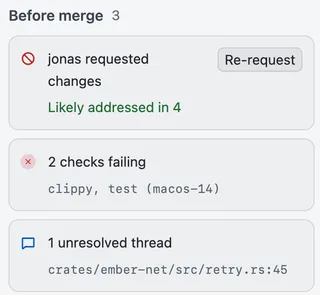
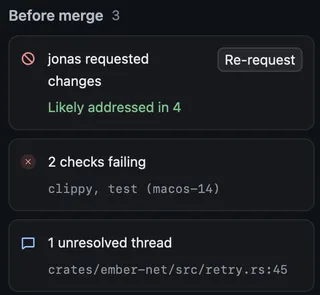
Before merge, at the top of the column at the Overview’s right, lists what GitHub requires, one row each, with a merge card at its foot. When the window is too narrow for the column, choose the Before merge button under the pull request’s header instead. The card says what to do next, such as “GitHub has nothing in the way.” Revue’s own notes, such as open threads, are listed there too. They’re advice, and never stop a merge GitHub allows.
Merge it
Section titled “Merge it”- Choose the pill when it says Ready to merge, or Merge on the merge card.
- Revue asks you to confirm, for example “Merge #409”. Choose how to merge (Merge commit, Squash and merge or Rebase and merge, as the repository allows) and check the commit title.
- Choose Merge.
The merge is pinned to the newest snapshot in your tab, and the confirmation names it. If someone pushes after that, the card says so, for example “#409 changed since snapshot 4. Review the new push before merging it.”, with Review new push and Merge it anyway.
Depending on the repository and your access, the card offers other ways instead:
- Add to merge queue, when the repository uses a merge queue. The queue picks the method.
- Merge when ready turns on auto-merge. Cancel auto-merge turns it off again.
- Update branch brings a branch that’s behind its base up to date.
- Merge as admin merges past GitHub’s rules, where you’re allowed to. Its confirmation names what it bypasses.
Merging needs write access to the repository. Without it, the card says so.
Merge a stack up to a layer
Section titled “Merge a stack up to a layer”In a GitHub stack, a layer merges from the bottom. The stack card in the sidebar offers Merge up to #N, which lands that layer and every unmerged layer below it in one go.
To stop lower down, choose the arrow beside it (“Choose how far to merge”) and pick Up to #N for any layer. A layer that can’t land yet says why, such as “Draft or closed”. A layer above a draft or closed one reads Blocked by #N.
- A layer behind its base needs the stack synced first. Revue doesn’t sync stacks, so the card gives you the command,
gh stack sync, to copy and run. - For a pull request that targets another open pull request’s branch, the pill reads Waits for #N until that one lands.
- A ghstack stack reads Land with ghstack, since ghstack lands its own pull requests.
Work with a stack covers stacks in Revue.